Instant Approach Teleport
Load directly onto the ILS glideslope and localizer with the aircraft configured for final approach instead of spending time flying the full route first.
Everything you need to sharpen your approach and landing technique in short, repeatable sessions.
Load directly onto the ILS glideslope and localizer with the aircraft configured for final approach instead of spending time flying the full route first.
Search a worldwide database of ILS-equipped runways by ICAO, airport name, or runway and jump into practice at the exact airport you need.
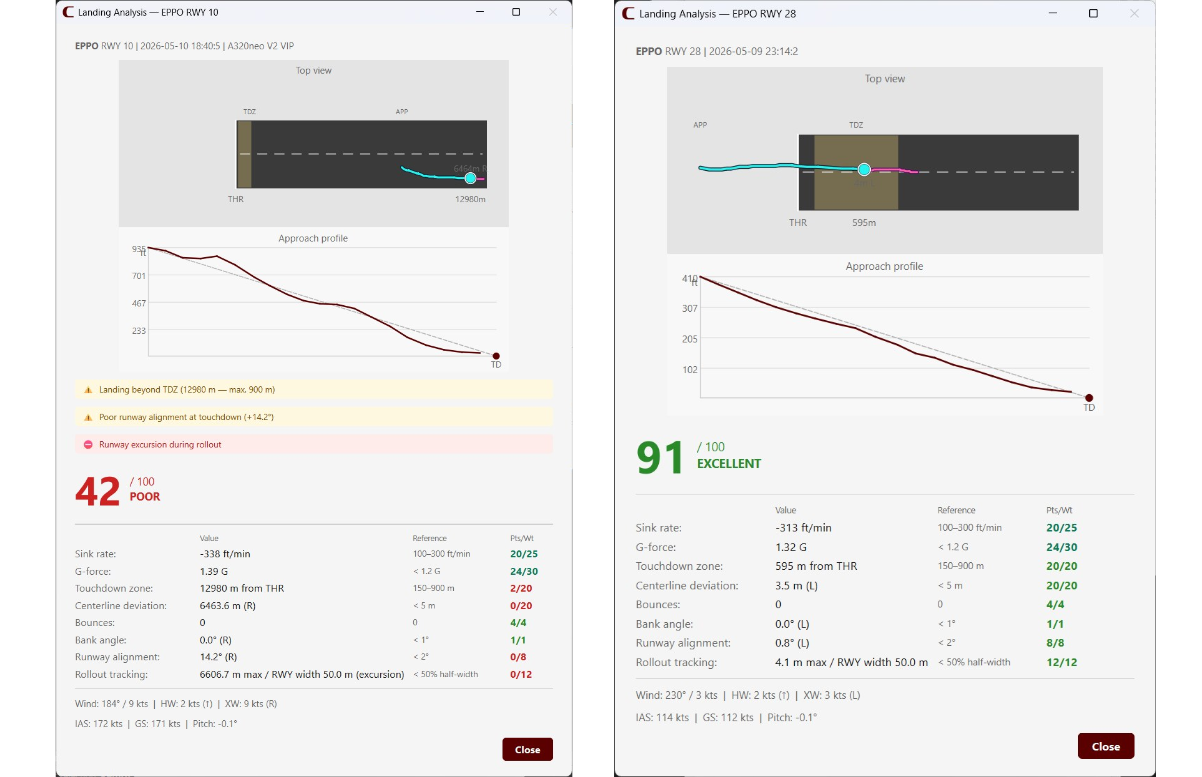
Review touchdown G-force, centerline deviation, touchdown zone accuracy, and approach speed so every repetition shows where to improve next.
Reset and fly the same approach again in one click, without long loading loops or manual repositioning between attempts.

Focused repetition
Use the same runway repeatedly, change conditions between attempts, and train only the part of the flight that matters for better landings.
Adjust altitude, approach speed, and configuration before teleporting so the setup matches your aircraft and training objective.
Landing Practice is designed specifically for Microsoft Flight Simulator 2024 and connects through SimConnect for precise placement and scoring.
Install the app, connect it to the simulator, and start training without extra paid plugins or subscription tools.
Evaluate the workflow before release with a downloadable trial build designed for focused landing-practice sessions.
Clear feedback
Each landing produces quick feedback you can compare across attempts, helping you spot patterns in approach speed, runway tracking, and flare timing.
Try Landing Practice before store launch with a downloadable Windows build focused on fast landing practice.
Free Trial
The trial lets you test the core workflow before purchase: searching approaches, teleporting onto final, repeating landings quickly, and reviewing scoring feedback after each attempt.
Download Free TrialReplace the file in assets/downloads/landing-practice-trial.zip with the public installer when the release-ready build is available.
The full version will be published through these sales channels after the alpha phase.
Built for simmers who want focused repetition instead of long setup flights.
Landing Practice exists for pilots who want to improve the hardest part of the flight without spending the whole session getting there first.
It is designed for Microsoft Flight Simulator users who want repeatable ILS training, quick feedback, and a lightweight companion app that stays out of the way.
CLB Studio builds practical companion software for simmers, with a focus on clear workflows, low friction, and tools that are easy to keep running alongside the simulator.
Compatibility, installation, trial scope, and support at a glance.
Landing Practice currently supports Microsoft Flight Simulator 2024 only.
Download the trial package, extract it, launch the app on Windows, and connect it to MSFS 2024 through SimConnect.
The trial is intended as a preview build and currently ships with limited-session access while the full public installer is being prepared.
The app uses SimConnect to place the aircraft on the selected ILS approach and then measures landing quality after touchdown using the session telemetry.
No. Landing Practice runs as a lightweight external companion process with minimal impact on simulator performance.
Store listings will be announced after alpha. For support in the meantime, contact contact@clbstudio.com.